오늘 할일
- 제목에다가 링크를 달 것임!
- 수정,삭제,조회수 증가
BoardSqlMapper.java
//상세글 보기
public ArticleDto findArticleById(int id);
//조회수 증가
public void increasReadCount(int id);
//글 삭제
public void deleteArticleById(int id);
//글 수정
public void updateArticleById(ArticleDto articleDto);
BoardSqlMapper.xml
<select id="findArticleById" resultType="com.ca.finalproject.dto.ArticleDto">
select * from fp_article fa where fa.id =#{id}
</select>
<update id="increasReadCount" resultType="com.ca.finalproject.dto.ArticleDto">
update fp_article fa
set fa.read_count = fa.read_count +1
where fa.id =#{id}
</update>
<delete id="deleteArticleById" resultType="com.ca.finalproject.dto.ArticleDto">
delete from fp_article where id = #{id}
</delete>
<update id="updateArticleById" resultType="com.ca.finalproject.dto.ArticleDto">
update fp_article fa
set fa.title = #{title}, fa.content=#{content}
where fa.id =#{id}
</update>
오류가 떴음 서버 자체가 가동이 안됐는데.. 이유가 무엇이냐??
update,delete,insert는 resultType을 담으면 안됨...
- 여기서 resultType="com.ca.finalproject.dto.ArticleDto"는
- → 이 SELECT 쿼리 결과가 ArticleDto라는 클래스 객체에 담긴다는 뜻
- 즉, DB에서 뽑은 데이터를 ArticleDto의 필드들(id, title, content 등)에 자동으로 넣어줌
근데 insert,update,delete에서는 그냥 숫자(int) 하나만 리턴됨
이런 식으로 몇 줄 업데이트됐는지 숫자만 리턴,
DB에서 데이터를 가져오는 게 아니다
❗ 그래서 resultType 붙이면 오류 발생!
MyBatis는 이렇게 생각함:
“어? 너 resultType=ArticleDto 썼네? 그럼 나 결과 row를 ArticleDto로 만들어줄게!”
→ 근데 UPDATE 는 결과 row를 안 줘. → 그래서 에러남. ❌
그래서 이렇게 바꿈
<select id="findArticleById" resultType="com.ca.finalproject.dto.ArticleDto">
select * from fp_article fa where fa.id =#{id}
</select>
<update id="increasReadCount" >
update fp_article fa
set fa.read_count = fa.read_count +1
where fa.id =#{id}
</update>
<delete id="deleteArticleById" >
delete from fp_article where id = #{id}
</delete>
<update id="updateArticleById">
update fp_article fa
set fa.title = #{title}, fa.content=#{content}
where fa.id =#{id}
</update>
근데 엄청난 발견 ! select에서도 뺄 수 있음!
이유 : 기본적으로 spring framework의 map이 알아서 반환값을 찾아줌
하지만 쿼리문이 복잡해지거나 등 동작이 안될 수도 있으니까 습관적으로 쓰는게 좋음
▼오류
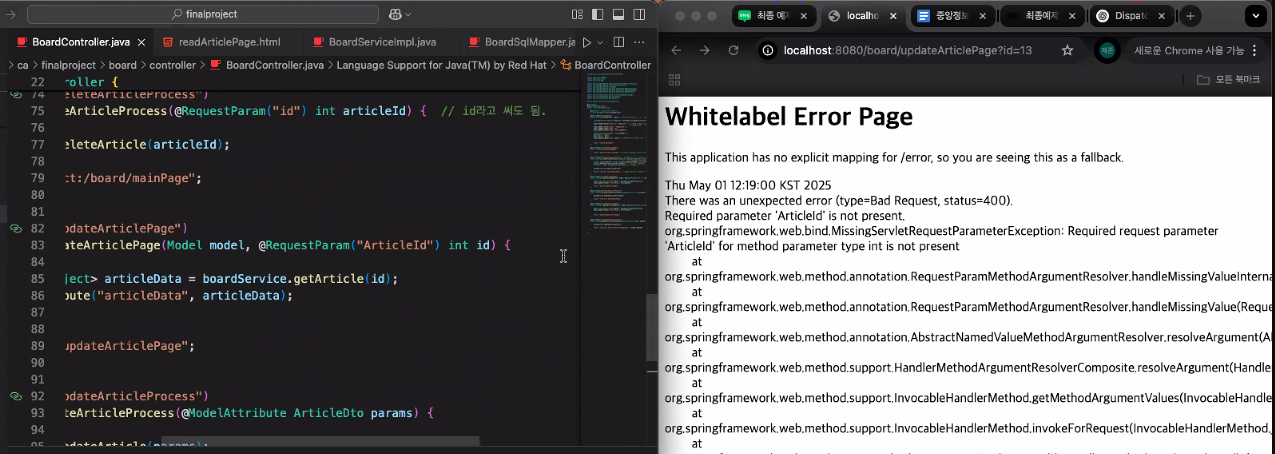
- 400번 오류
- bad request, 파라미터 전달이 안됨
- 보니까 링크에선 id라 되어있는데 코드에선 articleId라 되어 있어 같은 값을 해야함..!

- 세션은 램에 저장.. 프로그램을 껐다키면서 세션이 다 날라감 null이됐음
- getId 했을때 nullpointerExcetption이 나옴
- 뒤로가기는 request를 하지않음
- 서버를 재가동하면 세션 정보가 아예 날라간다
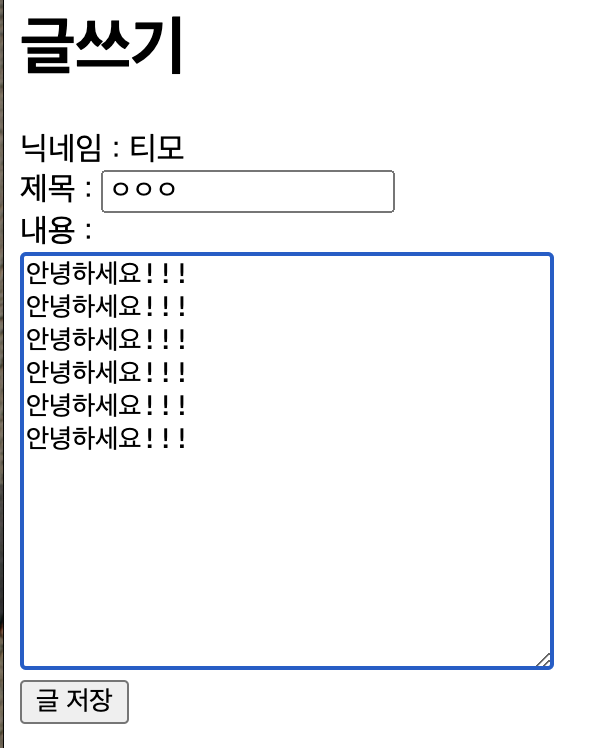

데이터베이스, 페이지 소스코드에서는 엔터처리가됐는데
게시판에서는 줄처리가 안됨 게시판 갔을 때 이 오류 해결 법..!
엔터를 br로 바꿔주는건 문법적인 요소가 아님 그래서 우리가 직접 enter->br로 해줘야함
readArticlePage.html
<div th:utext="${articleData.articleDto.content}"></div>
BoaradController.java
@RequestMapping("readArticlePage")
public String readArticlePage(Model model, @RequestParam("id") int id){
Map<String,Object> articleData = boardService.getArticle(id);
///html escape : 이거 안하면.. 스크립트 주입공격아 된다!
/// 지금 이 코드는 enter때매 한것! 졸아서 제대로 못 들음
/// 차후 js 작업시 자동으로 다 되서 신경 안 서도 됨..!
ArticleDto articleDto = (ArticleDto)articleData.get("articleDto");
String content = articleDto.getContent();
content = HtmlUtils.htmlEscape(content);
content=content.replaceAll("\n", "<br>");
articleDto.setContent(content);
model.addAttribute("articleData", articleData);
return "board/readArticlePage";
}
1. th:text vs th:utext
- th:text: HTML 태그를 그대로 문자열로 출력함 → <qwer>도 그냥 <qwer>로 보임 (태그 해석 X)
- th:utext: HTML 태그를 태그로 인식해서 적용함 → <qwer>는 인식 못 하니까 내용만 출력 (안녕하세요)
2. XSS(스크립트 주입 공격) 방지
- 사용자 입력 중 <script> 같은 악성 태그를 방지하기 위해 HTML 이스케이프를 적용
- → 예: <script> → <script>
3. 줄바꿈 처리
- 사용자가 작성한 줄바꿈 \n을 <br>로 변경해서 브라우저에서 줄바꿈이 보이게 처리
✅ DB 트랜잭션 개념 정리
1. Auto Commit vs Manual Commit
- Auto Commit: 쿼리를 실행할 때마다 자동으로 commit
- 장점: 편리함
- 단점: 실수해도 롤백이 안 됨 (복구 어려움)
- Manual Commit: 쿼리를 여러 개 실행한 뒤 직접 commit 또는 rollback
- 장점: 한 번에 처리하고 문제 생기면 rollback 가능
- 사용 예: insert, update, delete 같이 DB 상태 바꾸는 쿼리들
2. 트랜잭션(Transaction)이란?
- 하나의 작업 단위로, 여러 쿼리를 묶어서 처리
- 성공 시 commit, 실패 시 rollback
- 예: A, B, C, D 네 개 쿼리를 실행 → 하나라도 실패하면 전체 rollback 가능
3. DBeaver에서 Manual Commit 사용하는 경우
- 네 개의 쿼리를 작성하고 실행 → commit을 누르지 않으면 실제 반영 안 됨
- rollback을 누르면 실행한 쿼리들 모두 무효 처리됨
- 동시에 다른 사람이 같은 데이터를 조회해도 아직 commit 안 한 내용은 안 보임 → 세션(사용자)의 독립성 보장
'중앙정보기술인재개발원 > Spring' 카테고리의 다른 글
| [Spring] final project_2차 (0) | 2025.05.12 |
|---|---|
| [Spring] | 세션,쿠키,Session,Cookie (0) | 2025.05.02 |
| [Spring] | final project_3 (1) | 2025.05.01 |
| [Spring] | final projcet_2 (0) | 2025.04.29 |
| [Spring] | final project_1 (0) | 2025.04.28 |